Author: Jerry Jones

  • Import a Huge Database with MySQL Command Line in MAMP

    Import a Huge Database with MySQL Command Line in MAMP

    I needed to import a 500mb MySQL database today, and I didn’t want to mess with changing the max 32mb upload file size with phpmyadmin. The 32mb limit is due to having to upload and process the file, but if the file is on your local machine anyways, there’s no need to upload it. Let’s bypass the upload limit and import the database using the MySQL command line.

    Start up MAMP, open terminal, and enter:

    $ /Applications/MAMP/Library/bin/mysql --host=localhost -uroot -proot
    

    This will put you into a kind of MySQL shell. Now you can run a few basic commands to test it out.

    ## List all the databases
    $ show databases;
    
    ## It outputs a pretty ASCII drawing for your tables
    +-------------------------+
    | Database                |
    +-------------------------+
    | my_database             |
    | another_db              |
    | etc_db                  |
    +-------------------------+
    3 rows in set (0.00 sec)
    

    To import a new database, find the path to your MySQL database file, and run these commands:

    ## Create a new database if you haven't yet
    $ CREATE DATABASE my_db_name
    
    ## Move into the database, kind of like the `cd` command to switch directories in terminal
    $ use my_db_name
    
    ## Import the database
    $ SET autocommit=0 ; source /path/to/database/my_mysql_database.sql ; COMMIT ;
    

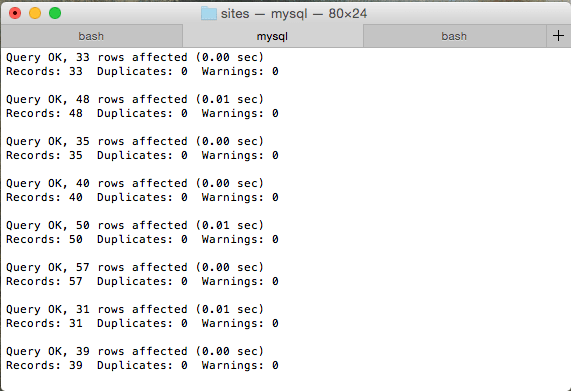
    Now you’ll see a bunch of queries whiz by. Once you see the command line ready for another prompt, you’re good to go!

  • Is This Thing On? A Toggle/Light Switch Quiz

    Is This Thing On? A Toggle/Light Switch Quiz

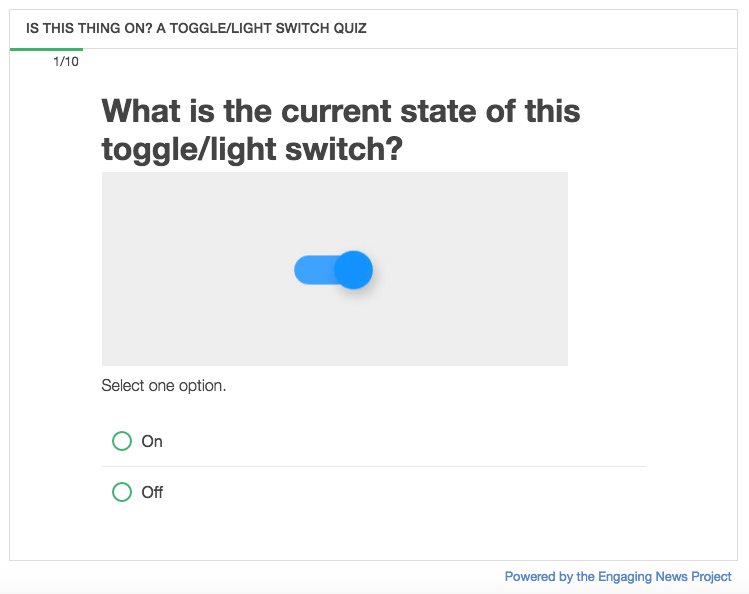
    Maybe it’s just me, but toggles and light switches always trip* me up. To pseudo-scientifically find out, I captured different toggle designs in the wild from the ol’ World Wild Web into a quiz using the Quiz Creator I designed and developed for the Center for Media Engagement.

    I’d be delighted if you took the time to answer 10 questions on what state (“on” or “off”) each toggle is communicating. Without further ado, here is the quiz, “Is this thing on?”

    Follow me on Twitter @juryjowns to hear the results.

    * Pun 100% intended.

  • Share Pie with Strangers

    Two years ago I spent the night in a cabin in an RV park in Northern California. My family and I finished dinner and lounged around a picnic table.

    A jovial man sat down and introduced himself. Talk quickly turned to work, and we realized we were both web designers/developers. I was a bit further down the track, and he had questions on a few different things like DNS and running a small web shop.

    Until that moment, I knew I enjoyed talking about design, development, and client management, but didn’t feel like I had anything to contribute. I didn’t believe I had any way to really help another designer/developer out. At times, it can feel like there’s so much I don’t know, it’s hard to have the confidence that I really know anything at all.

    But on a starry night near the Redwoods, eating apple pie with a stranger, I had a lot to offer.


    A year later, the small web shop I helped start fell apart.

    It was rough. I questioned my value and what I had to offer. The little confidence I had was shot.

    As I started to get my bearings again, I got a call from an unknown number.

    This man from California was calling to say how helpful our talk was that night. A year later, he was still thankful for that night. And so was I.

    His call came through at the exact time I needed it. It made my month. It kick started my confidence. Made me feel like I had something to offer after all.

    And here I am, another year later, thankful for that night and a phone call from a stranger.


    Be nice to people. Share what you know. Listen. Connect.

    And don’t forget to share some apple pie.

  • Terminal Command for Looking up Nameservers

    At The Engaging News Project, we recently upgraded our DNS hosting by moving over to Cloudflare. I wanted to test our site as soon as the nameservers updated to Cloudflare’s to make sure no weird issues popped up.

    Fortunately, there’s a handy terminal command for that!

    $ nslookup -type=ns jeremyjon.es
    

    nslookup is a command to query nameservers and get all kinds of info back related to the server it’s on and any DNS settings you want to… look-up. Pretty well named command, I guess.

    In our case, the nslookup -type=ns jeremyjon.es command will return all the nameservers of my site, jeremyjon.es.

    As of this writing, here’s the response for my domain.

    $ nslookup -type=ns jeremyjon.es
    
    Server:		8.8.8.8
    Address:	8.8.8.8#53
    
    Non-authoritative answer:
    jeremyjon.es	nameserver = ns3.dreamhost.com.
    jeremyjon.es	nameserver = ns1.dreamhost.com.
    jeremyjon.es	nameserver = ns2.dreamhost.com.
    

    To get different information about your DNS, like CNAME, MX, A Records, etc, just change out the ns part of -type=ns with the record type you’re looking for:

    $ nslookup -type=cname jeremyjon.es 
    $ nslookup -type=a jeremyjon.es 
    $ nslookup -type=mx jeremyjon.es 
    

    There’s plenty more nslookup can do that I imagine I’ll never, ever use as a front-end developer, but I’m glad it’s there if I need it.

    Clearing out DNS

    If you just made a DNS change and want to flush your cache to try to grab the updated nameservers and you’re on OS X 10.10.4 or above, use:

    sudo killall -HUP mDNSResponder
    

    Switching servers of any kind is stressful. Hopefully these commands will help your heart beat a little easier when making the switch.

  • Apple Bug Report – Non-native Focusable Elements Page Jump

    On iOS devices running Safari on version 10+, when focusing a non-native focusable element (ie – a div that is focusable via JavaScript or with a tabindex value) inside an embedded iframe on a page, the parent page will jump down the page and you have to scroll back up to return to the focused element.

    To reproduce, it,

    1. Use your iOS device on version 10+ and click the slider handle in the embedded quiz.
    2. When you click the handle to give it focus, the page will jump down and you’ll have to scroll back up to return to the slider.

    This is just a post to explain my bug report to Apple developers and any other devs who may be experiencing a similar issue. For more details, read this Stack Overflow question on this bug.

  • How to Fix Blurry Images in WordPress 4.4 from srcset and sizes

    In WordPress 4.4 they added a big feature: responsive images using srcset and sizes for all content images.

    This is amazing. Since WordPress is a hugely popular framework, the amount of bandwidth saved is astronomical. I’m really proud of the WordPress team for implementing this.

    But… there are some blurry images. It’s not a perfect one-size fits all solution for every site.

    If your images are full screen width, you’ll get a blurry image on wide screens because WordPress is telling your browser to use an image smaller than your browser width. It’s a simple fix, and if you don’t want to read my mini-rant, you can skip to the fix.

    The Backwards Way To Fix It

    When I was googling to see what others have done to fix this, the only answer I was coming across was to entirely remove the srcset responsive image approach. Go back to a plain ol’ img tag, thank you very much.

    I get it. Images are much easier that way. But I don’t think the importance of what srcset accomplishes was understood.

    When you use srcset with your image, you provide your browser with a bunch of different versions of your image from small ones to giganto ones. When you go to your site, your browser quickly scans the list of images and picks out the one it needs. That way you don’t download a 2000px wide desktop image onto your phone. You download the 400px one. When you’re paying for your data usage, that’s a big deal.

    So, if you’re getting blurry images in WordPress, don’t throw the baby out with the bath water.

    The Fix

    Here’s a snippet to drop into your functions.php file that will keep the benefits of srcset responsive images and never give you a blurry image. It won’t be a fine-tuned, Italian leather, srcset machine, but it’s far better than axing it entirely.

    function osteo_img_sizes($sizes) {
    	return '100vw';
    }
    add_filter( 'wp_calculate_image_sizes', 'osteo_img_sizes');
    

    This filter overrides WordPress’s default sizes attribute to tell your browser, “Don’t serve images larger than the screen width.” VW here stands for viewport width (your browser width).

    That’s it. It’s not perfect, but it serves the people that need it most: people on mobile devices with a slow and/or costly connection.

  • The Process of Building for the Web: Quiz Creator Case Study

    The Process of Building for the Web: Quiz Creator Case Study

    Engaging News Project’s Quiz Creator is by far the biggest product I have ever designed and developed. Over an eight month period, I did all planning, design, development, architecture, testing, documentation, and deployment.

    To give you an idea of what goes into building a professional web application, I’ve documented the overarching phases of the project.

    Planning

    [rsp_img id=”2087″ align=”center” size=”full”]

    It’s essential to identify your overall project goals first. These guide every decision throughout the entire project.

    Goals should be measurable, and for the Quiz Creator, our main goal was to have ten second tier news organizations regularly using the quiz tool. As of this writing, we’ve only soft-launched the Quiz Creator, so we won’t be able to analyze if we were successful until our marketing efforts are in swing.

    After the goals were identified, I worked on:

    • User Stories to identify common user types and what their needs are.
    • Competitive Analysis to see what the current market offers and how we can improve and build upon that.
    • Documenting the Current Quiz Tool. As this was a rebuild of their existing tool, I was able to use the current implementation to identify used features and pain points, and use the database to research which features were used and which were overlooked.
    • User Flow broken down by page and component to figure out exactly what a user would need or want to view at that time.
    • New Ideas were jotted down as I went through the above stages, and fleshed out when/if they were relevant to a component.

    Planning is the foundation for the whole project, so make sure it’s sturdy before you move on.

    Sketching

    [rsp_img id=”2107″ align=”center” size=”full”]

    Sketching is one of my favorite parts of any project. I think I could use a ruler to draw straight-lined boxes all day. Maybe it’s because I was a huge hippie in my twenties with curvy lines everywhere and now I’m over-compensating.

    Really, I think I love sketching because this is where the problem solving and strategy start to come together. Sketching allows me to evaluate lots of different possibilities quickly.

    Because I’ve already planned out what elements need to be on each component, I can read my notes on what needs to be included and why. You shouldn’t be adding new elements while you sketch, you should be figuring out how to display those elements.

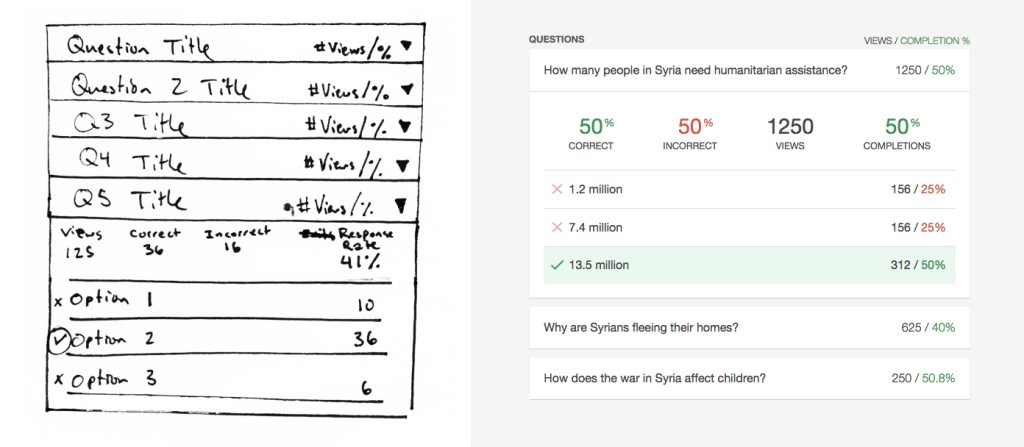
    Here’s a sketch of a component where people will view the individual question results from a quiz they created alongside an image of the completed component. The sketch is rough, but it shows the key elements that will be included and their placement. Also, note that it’s an oddity that the sketch matches the final component. Generally things change a lot more between sketch and completion.

    [rsp_img id=”2112″ align=”center” size=”full”]

    Once you’ve built and tested a lot of websites, you can visualize how someone would use the website and identify common traps. A five minute sketch can end up saving weeks of development time wasted on a bad idea.

    Testing

    Testing is an ongoing process, and it begins at sketching. I show people my sketches with a few directed questions and see if they understand what the components are how they would use them.

    Throughout the entire project, keep testing. These are generally informal at the beginning, and become more formal near the end of the project.

    For the Quiz Creator, I tested my sketches and prototypes informally, and then tested different elements of the production version as features were completed. Testing was done via Skype with willing members of the Engaging News Project team. I’d give them a task, such as “Publish a three question quiz,” and take copious notes on what they did, focusing on what was difficult for them to accomplish.

    Just as sketching can save you weeks of development, testing reveals issues you’ve missed or overlooked in your planning. The earlier you can identify these issues, the more time you’ll save. Test early, and test often.

    Prototyping

    Prototyping is used on designs that seem to pass muster, to see if they really do, indeed, pass muster. A lot can be gained by looking at a sketch on paper, but it’s another thing entirely to interact with it.

    I go as fast as I can on prototypes, not worrying about making things responsive or production-ready. There’s no database to interact with, and most elements are dropped in to get the idea across, not to be perfect.

    Here’s a series of my initial sketch for the add question view and how it changed from sketch through prototypes to final product.

    [rsp_img id=”2137″ align=”none” size=”full”]

    [rsp_img id=”2120″ align=”none” size=”full”]

    [rsp_img id=”2115″ align=”none” size=”full”]

    [rsp_img id=”2117″ align=”none” size=”full”]

    The one thing to spend more time on fine-tuning is what you think your client will be focused on. I knew the people reviewing the project were likely to get hung up on incomplete visual styles, so I polished up the typography and base styles. They were not perfect, but they were good enough to not be a distraction to people reviewing the prototype.

    Prototyping saved me a huge amount of overhead because I didn’t spend time implementing a complex system that would end up not working. When I built the production version, I was confident in the application, and usability testing confirmed that creating quizzes was an easy process.

    Architecture

    I’m mainly a designer and front-end developer, so this project was my first complex database build. If someone had told me that you get draw a bunch of straight lines when designing databases, I probably would have done this years ago.

    [rsp_img id=”2104″ align=”none” size=”full”]

    The rule of thumb for designing a database is to get it 90% complete before you start coding. You won’t get 100% coverage because you can’t foresee every possible scenario you’ll need, but if you’re 90% there, you have a strong foundation that will probably be able to accommodate anything you throw at it.

    At the same time as designing the database structure, I was working on how best to architect the methods that the Quiz Creator would interact with its own database as well as the site’s WordPress database. It was a project requirement for the Quiz Creator to be built on WordPress, but I wanted to make sure that:

    1. the plugin could be extracted in the future for other platforms without having to completely rebuild it,
    2. the database could live entirely outside of the WordPress database for speed and managing heavier loads,
    3. and, most importantly, quizzes could be embedded independently without firing up WordPress core.

    This was one of three ideas I sketched out on how the code should interact with the database to be robust, independent, maintainable, and extensible.

    [rsp_img id=”2109″ align=”none” size=”full”]

    Build

    Now that everything was in place and most of the big ideas had been figured out, I started coding the production version of the Quiz Creator. This was by far the longest part of the project, but things came together smoothly because of the extensive planning. Without planning, the coding would have gone as well as trying to build a house without a blueprint.

    I utilized ideas from progressive enhancement, responsive design, and web accessibility to make sure people had a great base experience on any device with any connection. The embeddable quizzes I went one step further on, and made sure you could take quizzes without cookies or localStorage. Everything is keyboard operable and screen reader friendly, and JavaScript is an enhancement, not a dependency.

    For tooling and coding (and to make sure I get to list all the hippest acronyms), I used:

    • Semantic HTML with ARIA Attributes where necessary
    • SCSS with classes using the BEM naming convention
    • JS
    • Gulp with BrowserSync, libsass, and some nice concatenators and minifiers for good measure
    • Git & Github
    • Terminal
    • Atom Editor
    • Object Oriented PHP

    There are many ways to build a site, but as long as it works quickly on any device and plays well with assistive technology, I’ll be happy with its codebase.

    Performance

    Performance is a consideration throughout the entire project (even when sketching!), but at the end is when analyzing performance across the wire makes the most sense. The lowest hanging fruit is minification and combining files. I focused on the embeddable quizzes the most, as I didn’t want people embedding bloated quizzes onto their sites.

    In the end, the final embedded quizzes only load 7 files for a total of 75kb. Here’s a quiz built using the Quiz Creator where two of the answers are in the previous sentence.

    Also, make sure you’re caching your resources and that everything is gzipped.

    Analyze and Refine

    Because this project just launched, I don’t have any data to analyze yet. Once I do, I’ll be using Google Analytics to look for:

    • What percentage of people arrive at the marketing page and end up registering for an account?
    • What percentage of those people complete the process and embed a quiz?
    • If they don’t embed a quiz, where do they fall off in the process?
    • What percentage of people create and embed multiple quizzes?

    Once I have those numbers, I can use the Quiz Creator database to anonymously look at how people are using the Quiz Creator, and hypothesize what things may contribute to people becoming long term users vs people who don’t end up embedding a quiz at all.

    A few possibilities might be:

    • Maybe if someone embeds a quiz that gets at least 1000 responses, they’ll be more likely to create another quiz.
    • Maybe people publish a quiz, but need more help with the embed process.
    • Maybe the benefits of using a quiz isn’t clear enough on the marketing page.

    Using the data collected, I can save time by making better guesses. Then, I can test new ideas to improve conversion rates against the current version via AB Testing or Multivariate Testing.

    Applicability to Other Projects

    The Quiz Creator was a huge project, but you can use these same concepts for anything you build on the web, big or small. It could be an entire rebuild, or as focused as trying to improve conversion rates on a sign-up form.

    Here’s a quick recap of the process.

    1. Plan: Identify a measurable goal you want to accomplish.
    2. Sketch: Problem solve ideas on how to accomplish your goals using pen and paper.
    3. Test: From here on out, test everything, and test often.
    4. Prototype: Use the medium you’re building for, and quickly prototype examples of your sketches to see what works and what doesn’t.
    5. Architect: Before you start coding, make high-level decisions on how pieces of the application will interact with each other.
    6. Build: Make it happen.
    7. Refactor: Improve performance by minification, reducing the number of files loaded, caching, and more.
    8. Analyze and Refine: Gather data on how people are using your application, and use AB testing to improve conversion rates in key areas.

    Processes vary from person to person and at different organizations, but this is what I’ve found works well for me and produces good outcomes for my clients.
  • Using BEM in the Wild

    BEM can get out of control if you’re not careful. On the first project I used BEM, I handcrafted this artisanal class name: .progress__bar__question-count__current-number.

    Yup. That’s four levels deep. I’m not proud of this.

    The goal of this article is to make sure another .progress__bar__question-count__current-number never gets written. Before we dive in, if you’re not familiar with the BEM naming convention, head over to B is for Block: An Intro to the BEM Naming Convention. Don’t worry, I’ll wait until you’re done.

    Ready? Good. Here we go!

    It’s BEM, not BEEEEM

    Be as descriptive as you need to be with your BEM class names to avoid duplication and confusion. Sure, my .progress__bar__question-count__current-number class lets me know that current-number is nested 4 levels deep in the HTML, but is that worth the verbosity?

    Nope.

    It means more changes to make in your CSS when you modify the HTML. Rather than duplicate your HTML structure, be descriptive and unique.

    When I refactor, .progress__bar__question-count__current-number will become .progress-bar__current-number.

    Ah. Much better.

    “The best is the enemy of the good.” – Voltaire

    I can get stuck in a pattern of trying to find the perfect solution rather than an easy one that accomplishes the task. As the saying goes, “Don’t let perfect be the enemy of good.” That’s when .progress__bar__question-count__current-number rears its ugly head.

    Remember, BEM is a convention to make your code easier to maintain. If it’s not making your code easier to maintain, modify it. BEM is a tool for you to use, not vice-versa.

    If a Block is Within Another Block, Mix It

    One of the great things about BEM is the flat class structure. You don’t have to nest anything in SASS or use multiple class names to win a specificity battle.

    That’s great… until a block is nested inside another block. Let’s say you have a .card block that has a .list and a .button inside it. What do you do? Do you duplicate the entire block again with the block name prefixed? That’s the only way to keep it 100% perfect and flat. So, should we do this?

    <article class='card'>
      <div class='card__header'>
        <h2 class='card__title'>B is for Block: How to BEM</h2>
      </div>
      <div class='card__content'>
        <ol class='list card__list'>
          <li class='list__item card__list__item'>
            Describe the Main Block with a word or two.
          </li>
        </ol>
        <a class='button button--with-icon card__button card__button--button-with-icon'>
          <span class='button__text card__button__text'>
            Read More
          </span>
        </a>
      </div>
    </article>
    

    No! Don’t put BEM in your BEM. That’s what leads you down the crooked path to .progress__bar__question-count__current-number! Heed my warning. Don’t do it. Nest the components, but mix the class names, and let your specificity win out with the nested class names. Like this:

    <article class='card'>
      <div class='card__header'>
        <h2 class='card__title'>B is for Block: How to BEM</h2>
      </div>
      <div class='card__content'>
        <ol class='list card__list'>
          <li class='list__item'>
            Describe the Main Block with a word or two.
          <li>
        </ol>
        <a class='button button--with-icon card__button'>
          <span class='button__text'>
            Read More
          </span>
        </a>
      </div>
    </article>
    

    Here’s the above example in a CodePen that highlights the components and displays the class names that go with it:

    See the Pen BEM Syntax Visualized by Jerry Jones (@jeryj) on CodePen.

    //assets.codepen.io/assets/embed/ei.js

    You might encounter a time where it’s helpful to put your BEM in your BEM a little bit, but be careful with it. Remember, BEM is supposed to be helpful to you and your team. Feel free to “modify” it.

    See what I did there?

    Blocks Don’t Care About Other Blocks… Until They Move In

    You have a .friend. They’re a good .friend, but sometimes they do things you don’t agree with. Nothing wrong with that.

    You have .your-house. You like your .friend and .your-house doesn’t care about what your .friend does. They can go wherever they want. Do what they want to do.

    Until your .friend gets kicked out. They need a place to stay.

    Enter, .your-house. But when your .friend is living with you, they’re going to need to follow your rules. .friend has to realize that now, they’re also .your-house__friend.

    // home sweet home!
    .your-house {
        laundry: clean;
        dishes: clean;
    }
    
    // do what you want! be you!
    .friend {
        laundry: dirty;
        dishes: dirty;
        goes-out: tons;
        pays-rent: nope;
        demeanor: nice;
        fun: yes;
    }
    
    // Uh oh. Gotta set some rules while
    // they're living in your house
    .your-house__friend {
        laundry: clean;
        dishes: clean;
        pays-rent: yes;
    }
    

    Blocks don’t care about other blocks. That’s what makes them maintainable and predictable. When you put a block inside another block, the parent block is the one that cares. .friend doesn’t care that it’s in .your-house. .your-house is the one that cares, so it sets the rules on .your-house__friend.

    Be a good .friend and keep .your-house class names tidy.

    The BEM Cheatsheet

    Here’s the cheatsheet of the tips for actually using BEM.

    1. Formatting: .block__element--modifier
    2. Describe the block with a word or two. If it’s two words, separate them with just one dash or do camelCase or whatever. Doesn’t really matter. Just be consistent and document it.
    3. Describe the __element with a word or two.
    4. Add --modifiers if necessary.
    5. Avoid lots of __elements unless you can’t avoid it. For example, .card__title__link__progress__icon is a little excessive.
    6. You can mix classnames that are parts of two blocks. For example, if it’s a .button block, but it’s also a .card__button element, you can use both in the HTML.

    That’s it. You should know enough to confidently use BEM and avoid common traps. You’ll still come across scenarios that you’re not sure what to do. We all do. If you have any questions or think I made a mistake, let me know at @juryjowns.

  • Modular and Descriptive Class Names

    What’s the big deal, just name it the first thing that makes sense, right? It makes sense now, so it will probably always make sense! .btn--small, .btn--tiny, .btn--really-tiny, umm… .btn--really-super-duper-tiny!

    Considering your class names avoids headaches and confusion down the road. But that’s easier said than done. Before we figure that out, let’s get some basics down.

    Formatting Your Class Names

    There’s lots of different naming conventions out there. I use BEM. If you’re not familiar with BEM naming, you’ll still get the gist of this article. If you want to learn about BEM, read this intro to BEM.

    I tend to use dashes to separate words in my class names. Use one or two words when you’re naming each component. It’s better to be long-winded and understood than terse and confusing.

    If you’re using BEM, as long as you reserve __ for separating blocks from elements and -- for modifiers, you’ll probably be OK. Whatever you do, be consistent and make sure you document it so other people know what convention to follow.

    // examples for naming classes
    // This is using BEM: Crash course!
    // .main-nav is the main block
    // .main-nav__link is an element inside of .main-nav
    // .main-nav__link--current-page is modifying .main-nav__link
    
    // Dashes to separate words
    .main-nav__link--current-page {
      color: blue;
    }
    // or camelCase
    .mainNav__link--currentPage {
      color: blue;
    }
    // or Capitalize the first word of each element
    .Main-nav__Link--Current-page {
      color: blue;
    }
    // or...  sure... FART separators... 
    // I guess... as long as it's consistent...
    .mainFARTnav__link--currentFARTpage {
      color: blue;
    }
    

    Avoid Using Visual Descriptors in Your Class Names

    Avoid using visual descriptions, because they may not always look that way. The designer might change the size of the h2 of the component, and all of a sudden that .small-header class doesn’t make sense. Or, it can change sizes across media queries or colors across states.

    For example:

    .big-blue-button {
      background: blue;
      color: white;
      font-size: 40px;
      padding: 20px 40px;
    }
    
    // a screen less than or equal to 640px wide
    @media (max-width: 640px) {
      // not so big anymore...
      .big-blue-button {
        font-size: 14px;
        padding: 8px 12px;
      }
    }
    
    // not so blue anymore...
    .footer .big-blue-button {
      background: red;
    }
    

    It’s better to name it as generically as you can for the component, while still communicating something specific. Using generic names means when the design team changes the color of the .big-blue-button to red, you don’t have to rename your HTML too.

    Like, What is Your Component at Its Core, Dude?

    Here’s how you can rework the same component using BEM, and thinking through it a little.

    What’s our main component, at its core. Like, who is it, really, like, really meant to be, duuude?

    .big-blue-button, after climbing to the top of Mount Everest on an intense soul-searching journey, realized it was really a .button in its heart.

    “But, you’re not just any .button,” we cry out! “You’re a big one! And a blue one!”

    For now at least. How can we signify that?

    Well, why is it big and blue? Because we want people using the website to see it, right? It needs to stand out.

    When would we be using it? When we really want people to click it, probably. Don’t focus on its looks. Like, stop being so vain and stuff. Instead, let’s focus on when and why we use it.

    The .button formerly known as .big-blue-button, I now knight you .button--call-to-action!

    By focusing on the reason and meaning of the button, we’ve found a class name that can stand up to design changes. And, as a bonus, if you can’t figure out a good name for it based on its meaning and purpose, there’s a good chance you don’t need it at all.

    Without further ado, let’s see some reworked CSS using our new class names.

    // main block
    .button {
      background: blue;
      color: white;
      font-size: 16px;
      padding: 8px 16px;
    }
    
    // modify your block
    .button--call-to-action {
      font-size: 40px;
      padding: 20px 40px;
    }
    
    @media (max-width: 640px) {
      // it's still a call to action,
      // even if it's small
      .button--call-to-action {
        font-size: 14px;
      }
    }
    
    // it all still makes sense!
    .footer .button--call-to-action {
      background: red;
    }
    

    Things just make sense now, ya dig?

    By staying consistent and considering the purpose of our components instead of how they look, we have modular class names that will stand the test of time.

    Do you have any tips or something I overlooked? Let me know on Twitter or in the comments.

  • B is for Block: An Intro to the BEM Naming Convention

    BEM (Block, Element, Modifier) is a great way to keep class naming consistent and meaningful. If you’ve never used BEM before but want to understand how it works, or if you’re thinking about using it for an upcoming site or component, this article is meant for you.

    If you’re already familiar with how BEM works, I’m writing another article focused on more use cases and examples. Follow me on Twitter and you’ll know when it’s out.

    Intro to BEM

    BEM is extremely helpful for building maintainable components that communicate the relationship between elements. Let’s learn by example and build a fake button component first.

    B is for Block: This is the name of our main component. In our case, it’s a .button.

    // Our Block!
    .button {
      padding: .6rem 1.2rem;
      color: white;
      background: black;
    }
    

    E is for Element: This is something that’s dependent upon being inside of the main block and is indicated that it’s an element by using two underscores (__) to separate it from the main Block name.

    // an icon element
    .button__icon {
      fill: white;
    }
    
    // the text of the button
    .button__text {
      margin-right: 5px;
    }
    

    Just from the CSS, if you’re familiar with BEM, you can tell what CSS depends on each other and what the HTML will look like. The .button__text and .button__icon elements will both be nested inside the .button block.

    Here’s what our HTML would look like:

    <button class="button">
        <span class="button__text">Read More</span>
        <svg class="button__icon">
            <use xlink:href="#icon-chevron--right" />
        </svg>
    </button>
    

    We have our main .button block and the elements inside of it (.button__text and .button__icon). BEM has given us some structure to see how the CSS is related, as well as how the HTML might be structured. Pretty helpful stuff.

    M is for Modifier: What if you want your button to be blue instead of black? No need to build a whole new component! Just add a modifier.

    <button class="button button--blue">
        ...
    </button>
    
    // Our Block!
    .button {
      padding: .6rem 1.2rem;
      color: white;
      background: black;
    }
    
    // our modifier!
    .button--blue {
      background: blue;
    }
    

    Because we’re using BEM naming conventions, we know that .button--blue depends upon (inherits) the styles from .button. When we make an edit to .button, we know it will affect .button--blue. Conversely, when we make an edit to .button--blue, we know it won’t affect .button.

    That’s the basics on how to use BEM. Really, that’s it. It’s helpful to use in any size project.

    Applying it in an actual site is a whole different beast though. That’s why I’m working on another article about how I’ve used BEM in complex cases to keep it helpful instead of a hinderance.

    The BEM Cheatsheet

    Here’s a quick cheatsheet of the tips for actually using BEM.

    1. Formatting: .block__element--modifier
    2. Describe the block with a word or two. If it’s two words, separate them with just one dash or do camelCase or whatever. Doesn’t really matter. Just be consistent and document it.
    3. Describe the __element with a word or two.
    4. Add --modifiers if necessary.
    5. Discussed in the upcoming article: Avoid lots of __elements unless you can’t avoid it. For example, .card__title__link__progress__icon is a little excessive.
    6. Discussed in the upcoming article: You can mix classnames that are parts of two blocks. For example, if it’s a .button block, but it’s also a .card__button element, you can use both in the HTML.

    That’s the Basics: Next Steps

    There’s plenty more to class names than using BEM though. I have some tips on how to create class names that are descriptive, useful, and modular, and why that’s so important.

    Connect with me on Twitter to get alerted when the next article is posted. Until then, if you want to take a deep dive into BEM, @StuRobson has a big ol’ list of BEM Resources.